MICROSOFT 365 COPILOT BLOG
Microsoft 365 Copilot: What’s New | July 2026
This is the English edition of the Chinese compilation of Microsoft 365 Copilot’s official monthly update for July 2026. Each month, we review new features and improvements to help Microsoft 365 customers stay current with the latest Copilot capabilities and help users work more efficiently in the apps they use every day.

User capabilities
Add agents in Copilot Chat
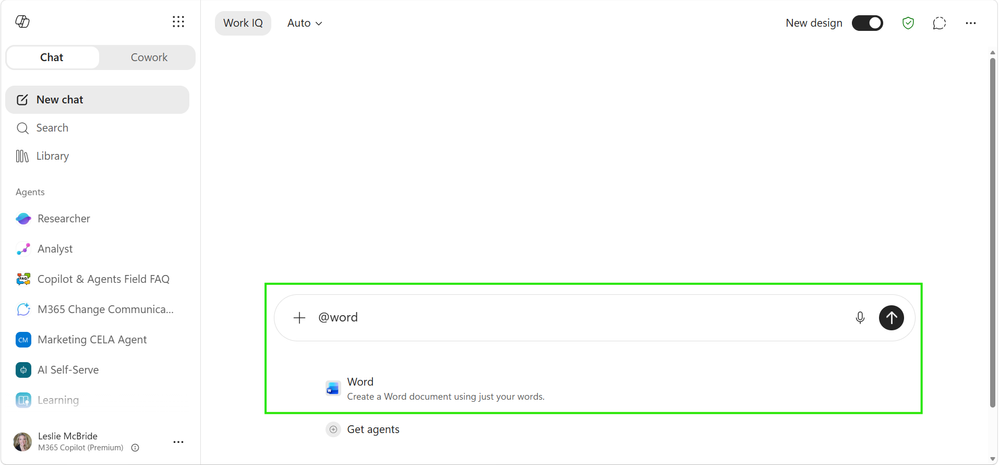
Rolled out in JulyUsers can now add Word, Excel, and PowerPoint agents directly to prompts in Copilot Chat. After opening Copilot, simply @mention the relevant agent to add it to the conversation, enabling users to create documents, spreadsheets, and presentations without leaving the Copilot app.
Copilot app: model updates, enhanced search, and push notifications
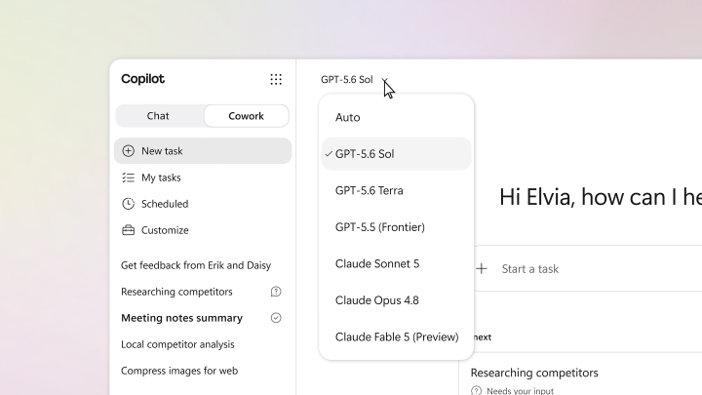
- OpenAI GPT-5.6 family of models becomes availableRolled out in July
The GPT-5.6 family of models is now available in Microsoft 365 Copilot. Optimized for knowledge work in Microsoft 365, this family delivers stronger reasoning for complex, multistep tasks: helping Copilot refine initial ideas into polished drafts in Word, perform deeper analytical reasoning in Excel, create richer presentations in PowerPoint, provide clearer answers in Chat, and carry end-to-end deliverables through to completion in Cowork. Grounded in the user’s work context, GPT-5.6 makes Copilot better equipped to handle the complexity of knowledge work. - Anthropic Claude Sonnet 5 becomes availableRolled out in July
Claude Sonnet 5 is now available in Microsoft 365 Copilot. Designed for agentic, multistep work, the model is well suited to tasks such as drafting documents, analyzing spreadsheets, and creating presentations, and is currently available in Copilot in PowerPoint, Word, and Cowork. It further expands Copilot’s model lineup, allowing people to choose the best model for the task at hand. With Work IQ, Copilot is grounded in files, meetings, chats, and business data to deliver results that are highly relevant to the user’s work context. - Improved answers in Copilot SearchRolled out in July
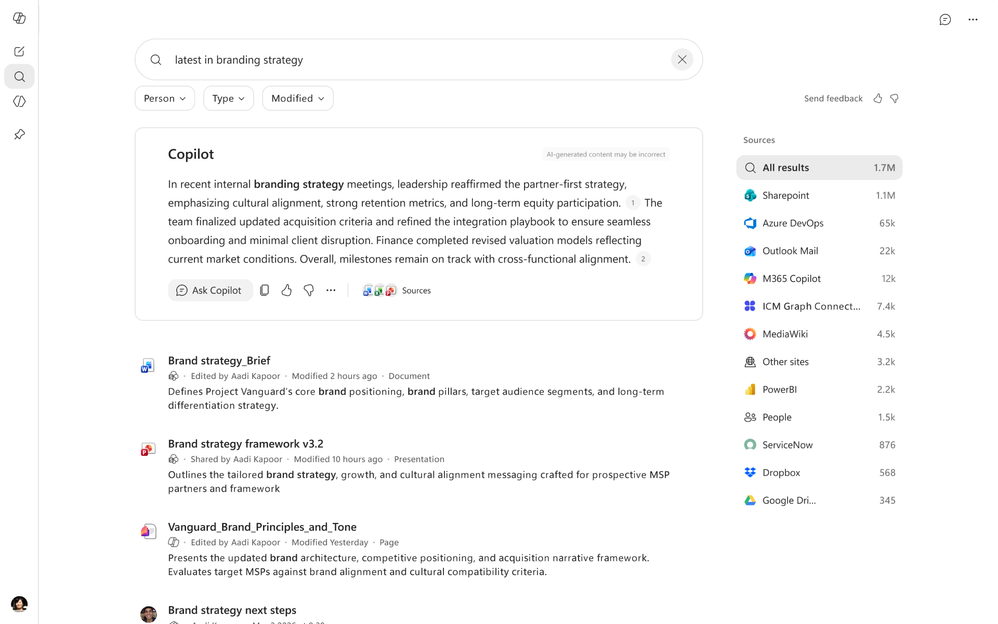
Copilot answers in the Copilot Search module have been improved to help organizations use Copilot more effectively: answers are more concise, while a more prominent prompt lets users know they can continue the conversation in Copilot Chat in the sidebar. This creates a smoother user experience, requires fewer manual actions, and gives IT teams a clearer path for driving deployment and adoption. - Mobile push notificationsRolled out in July
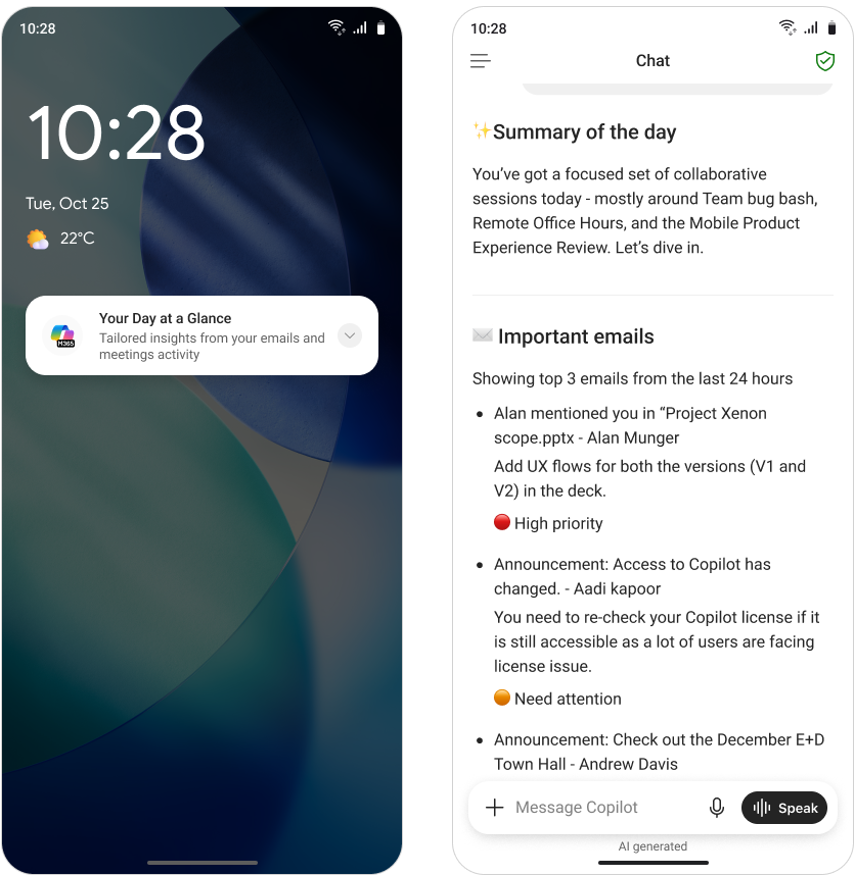
The Microsoft 365 Copilot mobile app now includes push notifications, helping iOS and Android users quickly stay on top of action items without manually checking multiple Microsoft 365 apps such as Outlook and Teams. Users receive notifications for relevant prompts such as “Your Day at a Glance” and “Items waiting for you”; tapping a notification opens the Copilot mobile app with the corresponding response already displayed on screen. This feature is available only to users with a Microsoft 365 Copilot license.
Cowork: model updates and new ways of working
- Anthropic Claude Fable 5 becomes availableRolled out in July, off by default
Claude Fable 5 is now available as a model update in Copilot Cowork for users who need to handle longer, more complex work. According to Anthropic, Claude Fable 5 was built for ambitious, long-running projects, with stronger sustained reasoning, deeper context handling, and the ability to plan, execute, and review its own work across multistage tasks. In Cowork, this provides another model option for agentic work requiring greater persistence and depth, allowing users to delegate complex workflows with less step-by-step supervision while remaining grounded in their own work context. - Local browser automation based on Microsoft EdgeRolled out in July
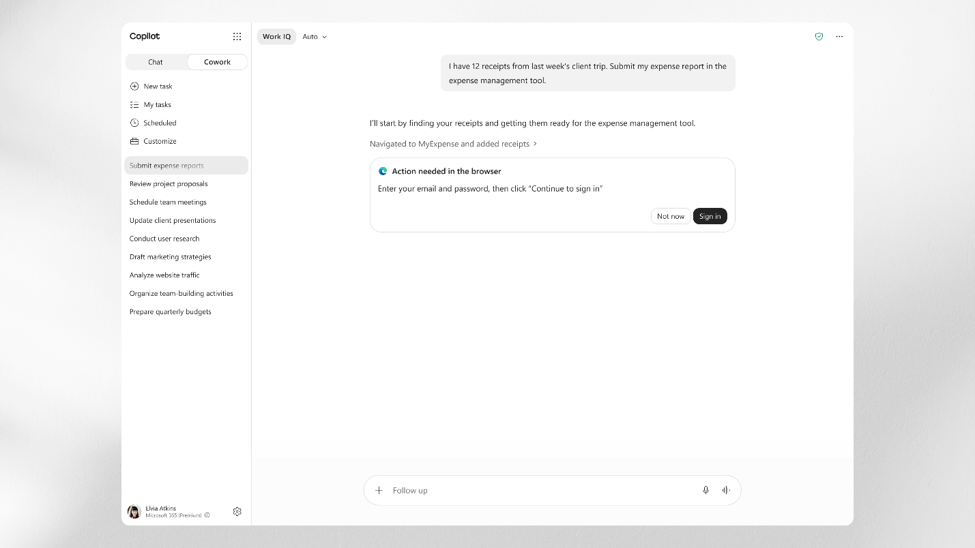
Users signed in to Edge can have Cowork perform tasks across the web systems they use every day, such as SaaS tools and internal portals. With Cowork acting across websites on their behalf, users no longer need to spend significant time manually switching tabs. - Event-triggered tasksRolled out in Frontier in July
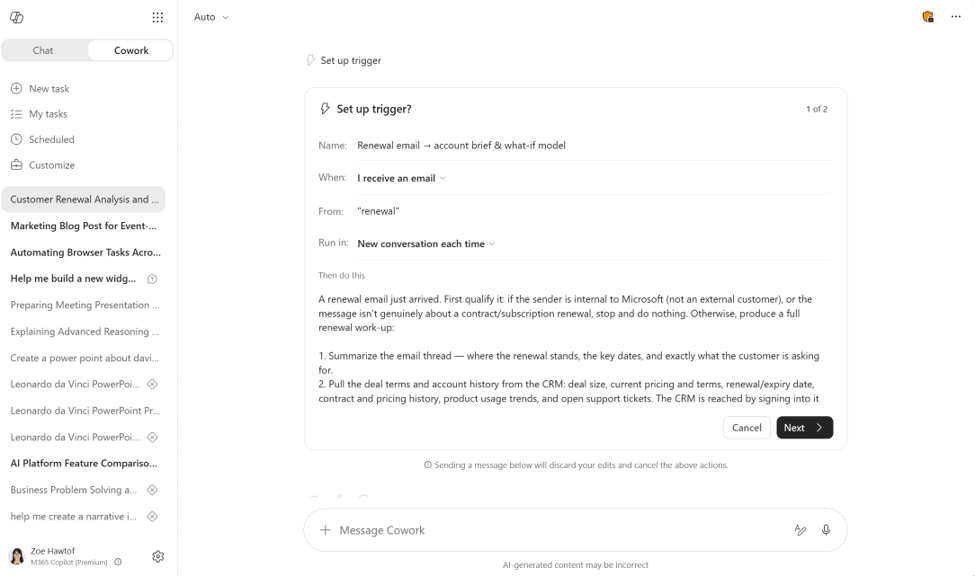
With event-triggered tasks, users no longer need to keep refreshing their inbox or worry about missing important alerts. Users can have Cowork monitor what truly matters in email and Teams, detect updates the moment messages arrive, and prepare a response before the user even asks. A trigger can be a particular sender, an @mention, a keyword or topic, or an event name; users simply describe the trigger in everyday language, and the task runs across Teams chats and channels, Outlook email, and meetings. - Customize Cowork with skills and pluginsRolled out in July
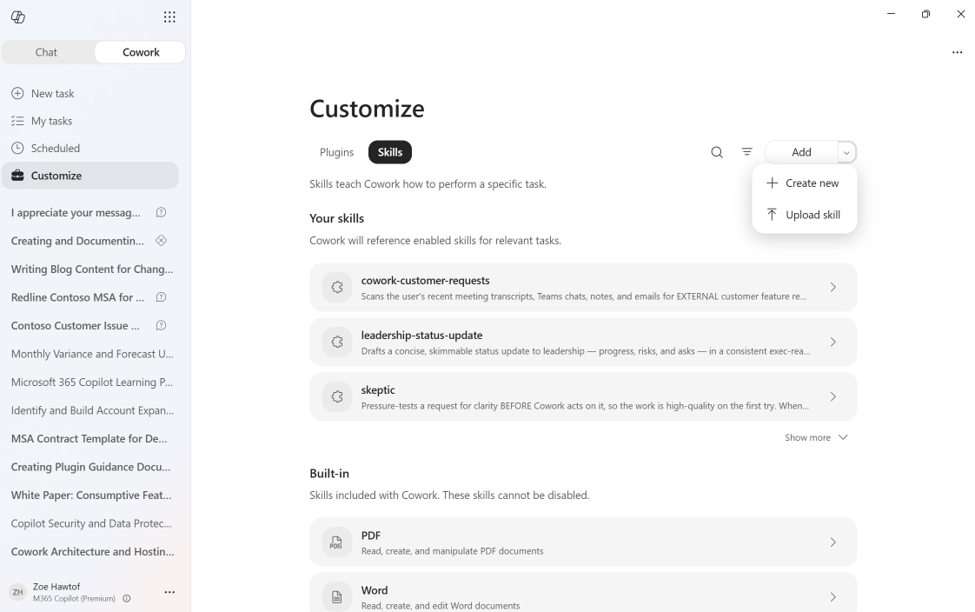
Skills and plugins let users easily customize Cowork and extend it to the systems they rely on. Now, on the “Customize” tab, users can add skills through a guided “New” flow or drag and drop existing .md, .zip, or .skill files into “Upload skill.” Plugins work the same way: Claude or Open-Plugin zip packages are automatically converted into publishable packages containing their accompanying skills and MCP connectors. This reduces manual configuration and makes sharing simple—users can share any skill or plugin with specific people in their organization while retaining ownership, and every subsequent change is automatically synchronized with those people.
Copilot Notebooks: support for more reference file formats
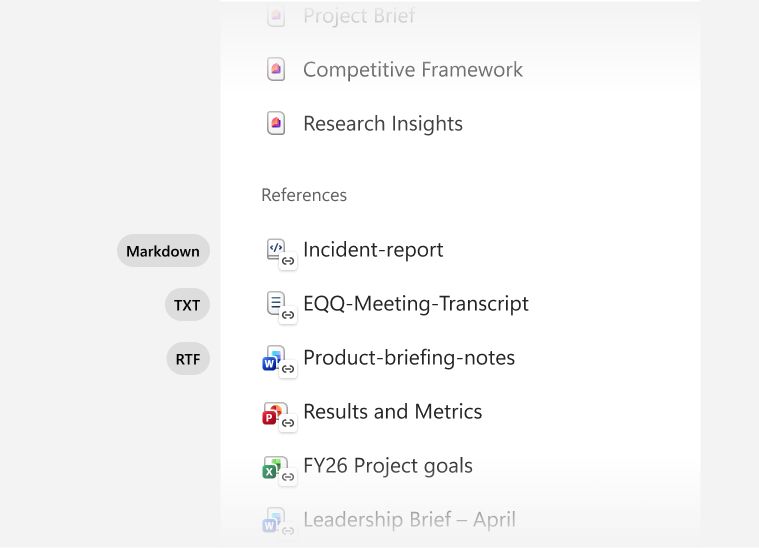
TXT/RTF rolled out in JulyMarkdown rolling out in AugustCopilot Notebooks now supports Markdown (.md), TXT (.txt), and RTF (.rtf) files as notebook reference sources, helping organizations reason over more project context. Users can add content such as software documentation, video transcripts, and rich-text notes directly to a notebook, then use Copilot to turn these inputs into useful project artifacts.
Copilot in Word: review and drafting workflows
Review workflowRolled out in June
With Copilot’s review workflow in Word, users can edit documents with Track Changes turned on, making every proposed change transparent and easy to review. Because changes are visible by default, users can easily inspect and approve them one by one. Users can also ask Copilot to add, read, reply to, and manage comments, keeping feedback organized and consistently tied to the right location in the content.
Drafting workflowRolled out in July
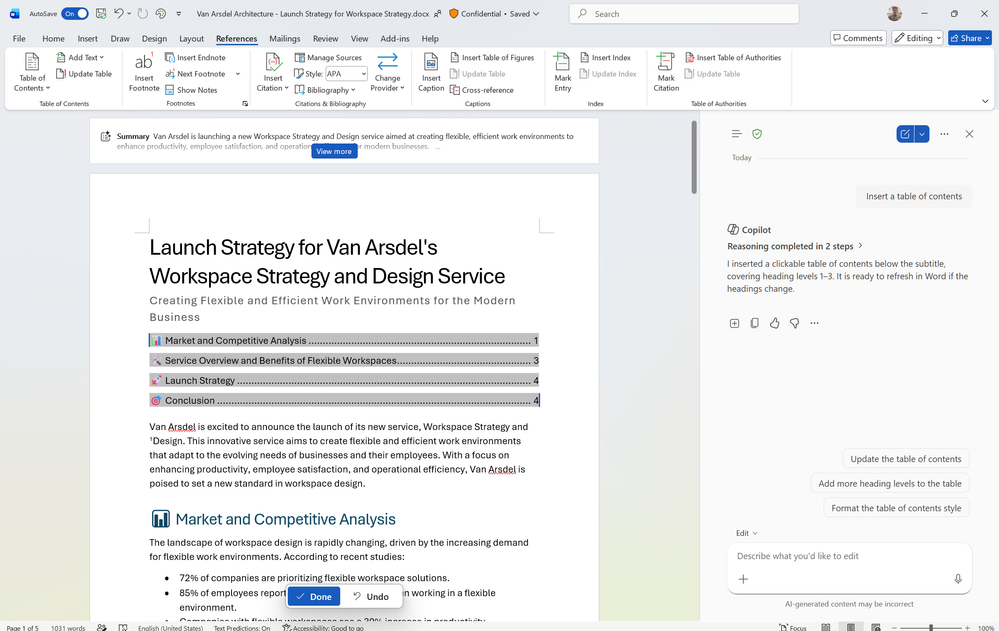
Copilot can now insert and update a table of contents, keeping documents organized as they evolve. It can also help manage headers, footers, page numbers, dates, and footnotes, making document formatting easier and enabling users to keep documents polished and professional without manual work.
Copilot in Excel: new skills and Power BI context
- Brand kit skillRolled out in July
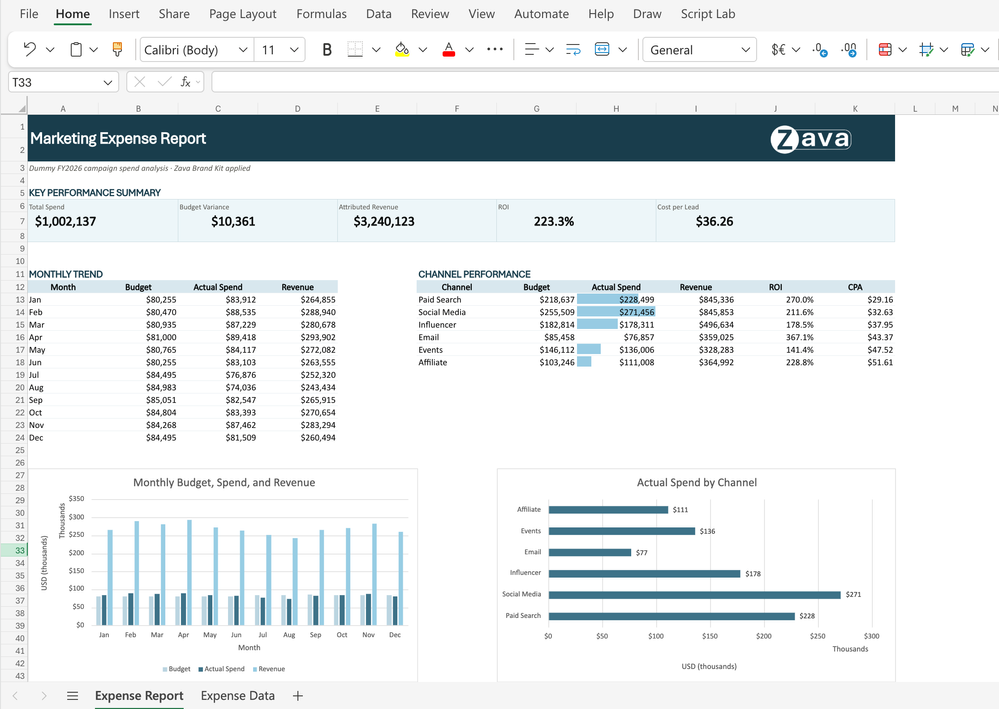
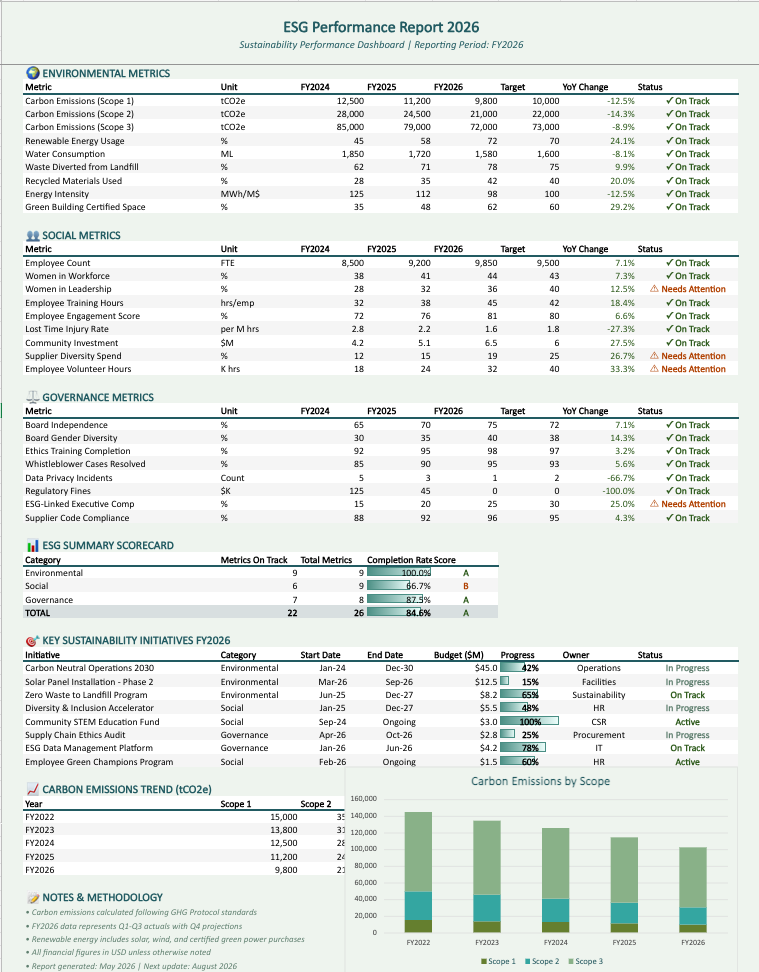
This skill enables Copilot in Excel to format workbooks using an organization’s brand kit from the Microsoft 365 Brand Center, automatically applying approved colors, fonts, and logos to tables and charts so every report complies with the company’s brand standards. Users simply invoke the brand kit skill and ask Copilot to apply brand styling to a table to get a polished, on-brand, presentation-ready report without any manual formatting. - Theme design skillRolling out in August
Users can now apply a coordinated design theme to their data: selecting a harmonious color palette, polishing charts, and planning layouts so key insights stand out. Use the @theme-design skill and ask Copilot to design or polish a table; it produces clearly structured formatting that turns raw data into a clean, readable report and eliminates manual design work. - Analyze governed Power BI dataRolling out in August
Copilot in Excel can now analyze governed Power BI data, bringing trusted business metrics directly into the Excel grid. Users can attach a Power BI report from the work content picker, then ask Copilot to analyze performance, identify trends, and build summaries or supporting calculations in Excel. Copilot works directly with the report’s underlying data while respecting existing row-level security (RLS), so users do not need to export data, manually copy and verify figures, or switch back and forth between Power BI and Excel. - Support for more cloud workbooksRolling out in August
Copilot in Excel now supports more workbooks saved in the cloud, including files on Windows and Mac with AutoSave turned off. Previously, Copilot required AutoSave to be enabled, making some otherwise supported workbooks unavailable. Now, when AutoSave is off and a workbook has unsaved changes, Excel prompts the user to enable AutoSave before Copilot begins making changes, protecting unsaved work; users can also choose to continue using Copilot without enabling AutoSave.
Copilot in PowerPoint: brand assets, custom skills, and more
- Use company brand assetsRolled out in July
Users can now use company brand assets from Microsoft 365 brand kits directly in Copilot in PowerPoint, including logos, icons, themes, and fonts. Brand managers can securely update and distribute preferred brand kits, ensuring a consistent design style across company assets. Within PowerPoint, users can select company templates and apply brand colors, images, and icons to create presentations that comply with brand standards. - Custom user skillsRolling out in August
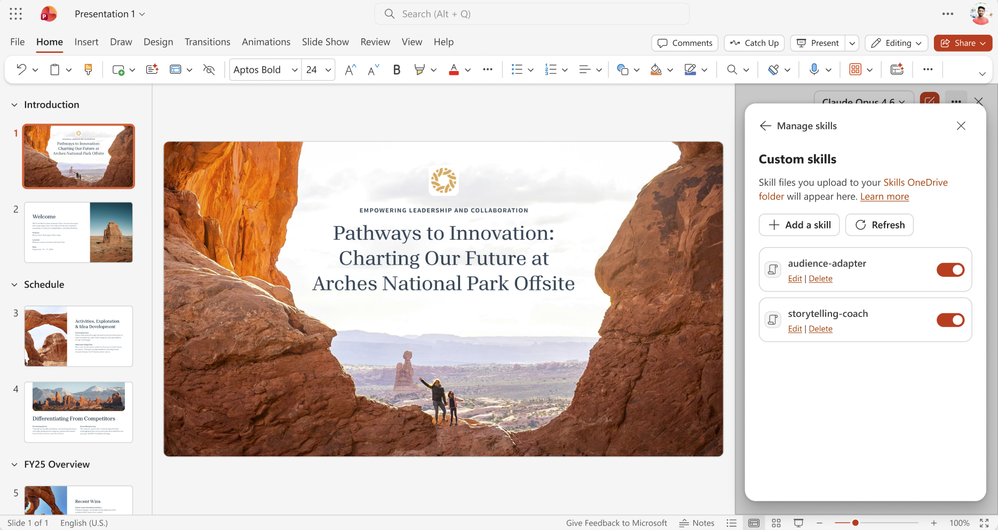
Copilot in PowerPoint now supports custom user skills, allowing users to create, upload, and update their own skills in OneDrive. Skills turn repeated instructions into reusable guidance that Copilot can apply at any point in presentation workflows. - Write, reply to, and resolve commentsRolled out in July
Copilot in PowerPoint can now write, reply to, and resolve comments directly within a presentation. Users can ask Copilot to draft new comments, respond to existing feedback, or close resolved comment threads without switching context. This makes slide feedback easier to organize, reviews faster to advance, and collaboration less labor-intensive. - Assign tasks and notify people in commentsRolling out in August
Users will soon be able to assign tasks and notify relevant stakeholders in comments through Copilot in PowerPoint. Users can ask Copilot to turn feedback into assigned follow-up items and bring the right people into the discussion directly from a comment thread. This helps teams move from receiving feedback to taking action more quickly, keeps presentation reviews organized, and reduces the manual effort required to track next steps across stakeholders. - Enhanced capabilities on iOS phones and iPadRolled out in July
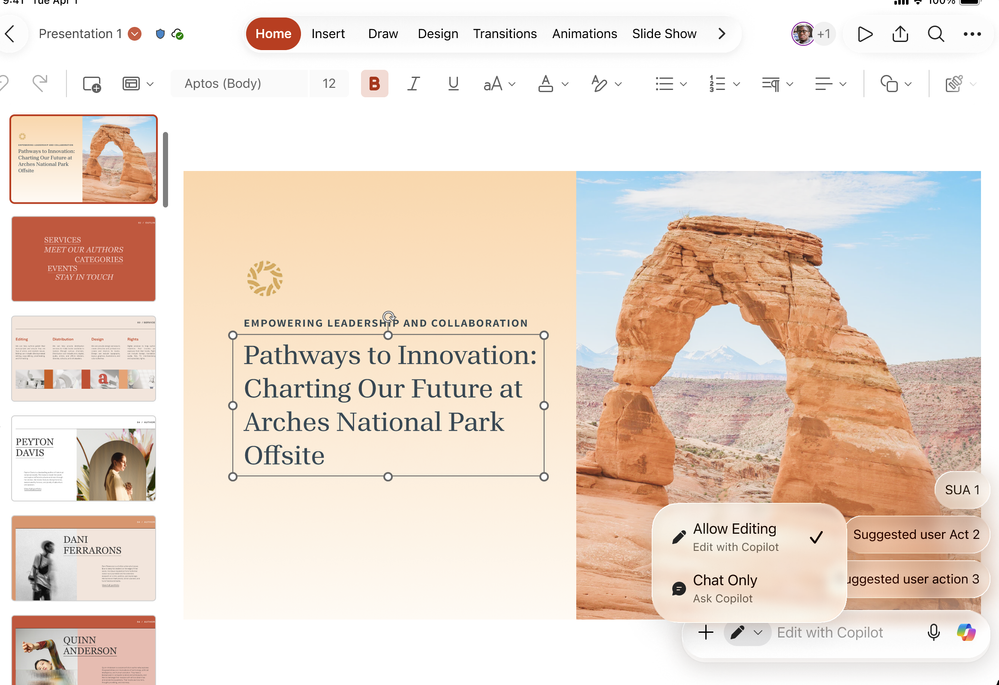
Copilot in PowerPoint has gained several key capabilities on iOS mobile devices and iPad: first, Copilot can now plan multistep operations such as creating, editing, and analyzing; second, Copilot supports both implicit grounding in the current slide and explicit grounding in attached files; third, to support mobile work scenarios, users can continue working or switch to other apps while Copilot works in the background. - Create or restyle using another presentation as a referenceRolled out in June
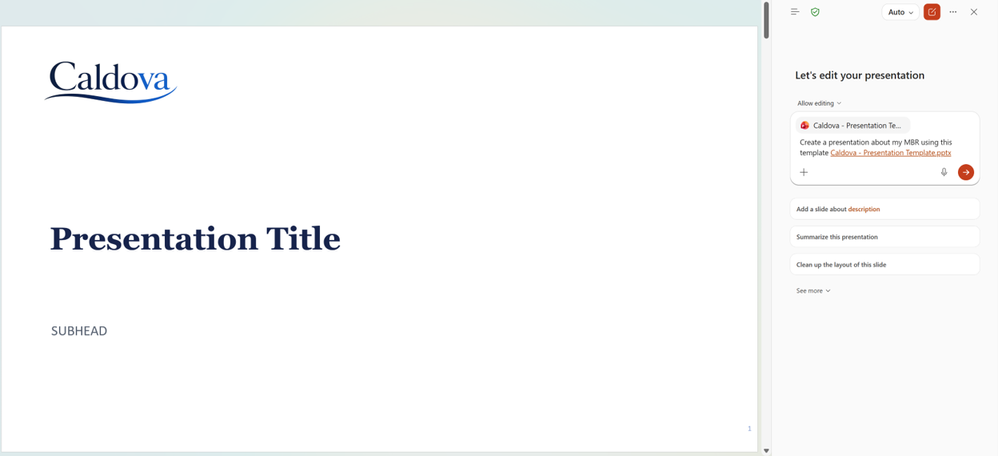
Users can now use a presentation as a reference to create a new presentation or restyle an existing one. Users can either attach a PowerPoint file as a reference or open a presentation and ask Copilot to use its visual style when creating a new presentation or transforming an existing one. Copilot applies the reference presentation’s layouts, theme, and visual system to produce a polished result with a consistent style. This lets users easily reuse proven designs, align content with brand standards, and match the look and feel of existing presentations without manual rearrangement.
Copilot in Teams: Meeting recaps app
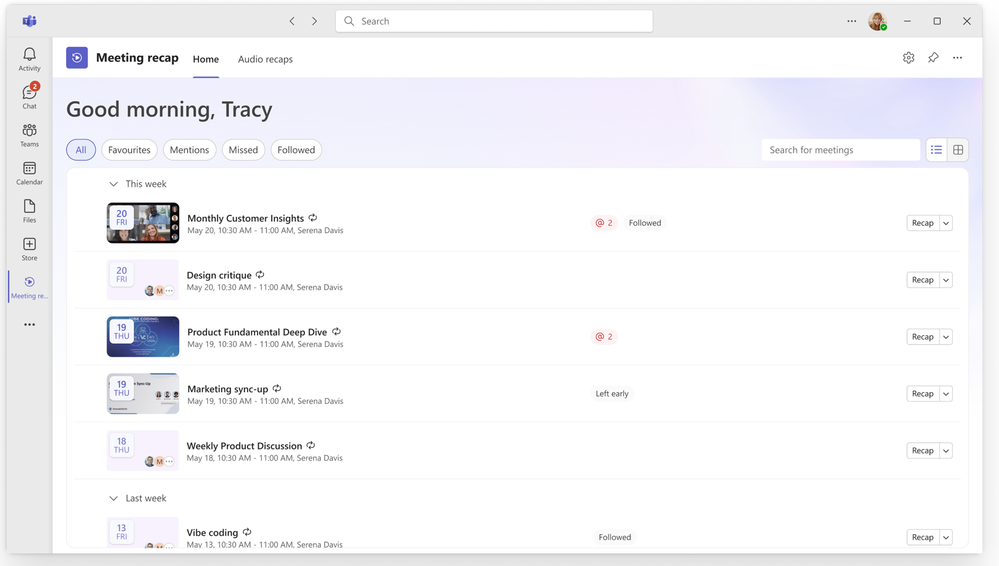
Rolled out in JulyThe new Meeting recaps app brings AI-generated meeting recaps together in one convenient app that can be pinned to the Teams sidebar, making it easy for users to find recaps and quickly catch up. Users can use quick filters to rapidly locate meetings they care about, browse and revisit meetings with recaps from the past 30 days, or generate audio recaps to listen to meeting highlights anywhere.
SharePoint and OneDrive: access heatmap, AI summaries, and document generation
Agent Access Insights heatmapRolled out in July
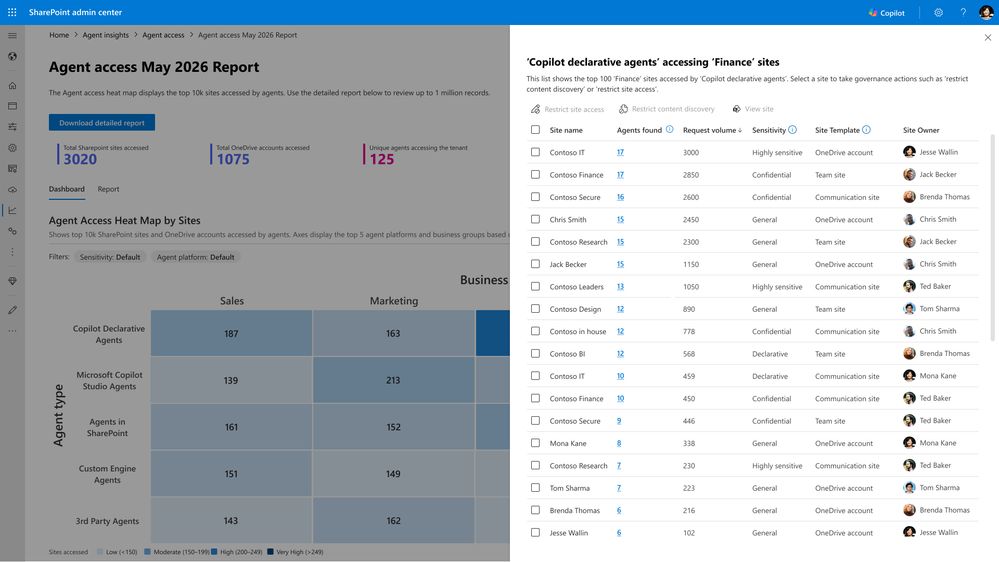
The new Agent Access Insights heatmap for SharePoint and OneDrive sites helps organizations use Copilot more effectively. It presents agent activity as a visual heatmap, enabling administrators to quickly identify patterns, hotspots, and unusual access behavior. While improving the user experience and reducing manual investigation, it also gives IT teams a clearer path for driving deployment and adoption.
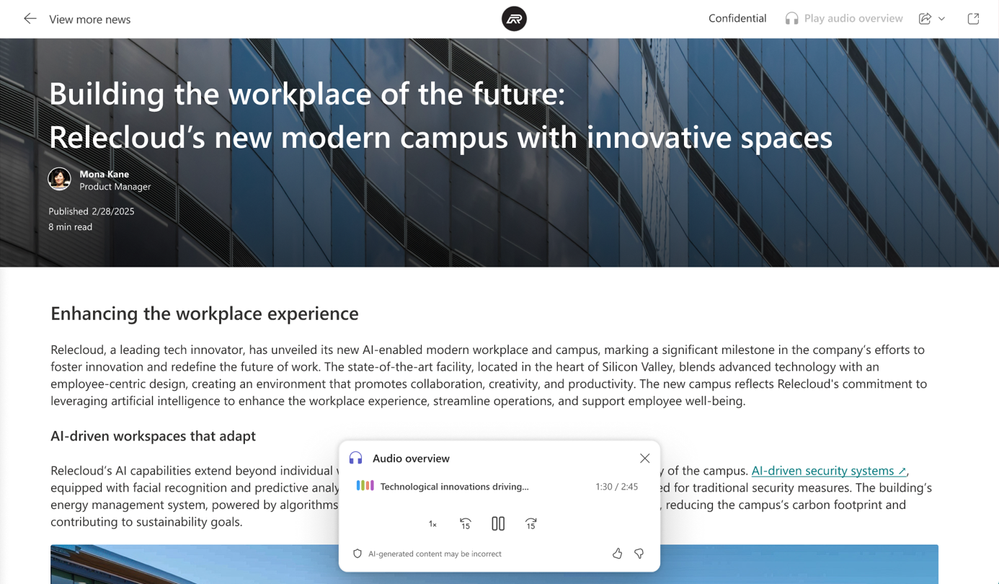
AI audio summaries for SharePoint newsRolled out in June
Users can listen to AI-generated audio summaries of SharePoint news posts in the SharePoint app for Teams (Viva Connections), making it more efficient to get news updates and stay informed without disrupting the flow of their daily work.
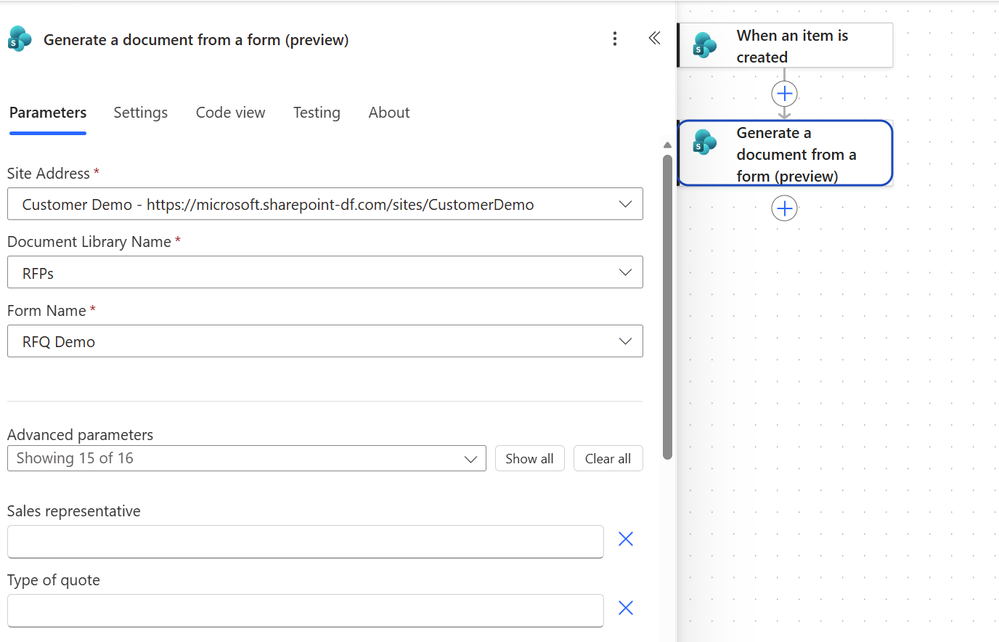
Generate documents from forms through Power AutomateRolled out in June
Users can now generate documents from forms in SharePoint with Power Automate. A new Power Automate action supports automatically generating documents from Document Generation (DocGen) forms in SharePoint; “Generate document from form (preview)” lets customers map data inputs to predefined fields in a template and generate a document from that template.
More Copilot connectors
Rolled out in JulyMore Copilot connectors are now available, bringing industry-specific knowledge directly into workflows while respecting existing security, compliance, and permission settings. Connectors enable users to retrieve, reason over, and act on data from their organization’s existing business systems. The new connectors span multiple industries:
| Industry | Connectors |
|---|---|
| Financial services | Daloopa, FactSet, Fitch Solutions, Morningstar, PitchBook, S&P Global |
| Professional services | Dice, Forrester, HG Insights |
| Industrial and manufacturing | Infor Nexus, Sight Machine |
| Software and technology | Granola |
| Healthcare and life sciences | Article Galaxy, Nyquist AI |
| Retail and consumer goods | Passby Pulse, Polar Analytics |
| Cross-industry | CB Insights, Sprouts.ai |
Users can now discover and connect data sources directly from the “Add and manage data sources” menu, and can scope a prompt to a specific connector for more targeted results. By connecting specialized enterprise data to Copilot, organizations can help employees gain more relevant insights, richer context, and industry-specific knowledge across Copilot experiences. These connectors are now generally available and can be managed by administrators.
Connector support for the U.S. Government DoD cloudRolled out in June
Organizations in the U.S. Government DoD cloud can now bring knowledge from external business systems directly into Copilot through Microsoft-built connectors, including Atlassian Jira and Confluence. Previously available in GCC and GCC High, these connectors can access business data in CRMs, databases, document repositories, and other enterprise applications, giving Copilot more of the information employees rely on every day so it can provide more relevant, accurate, and well-grounded answers while reducing time spent searching across systems. Content is securely indexed into Microsoft Graph and always remains within the organization’s Microsoft 365 tenant boundary; existing permissions, compliance policies, and security controls continue to govern access, helping organizations meet security, privacy, and data residency requirements.
IT admin capabilities
New controls and reports in the Microsoft admin center
- Domain exclusions for web groundingRolled out in July
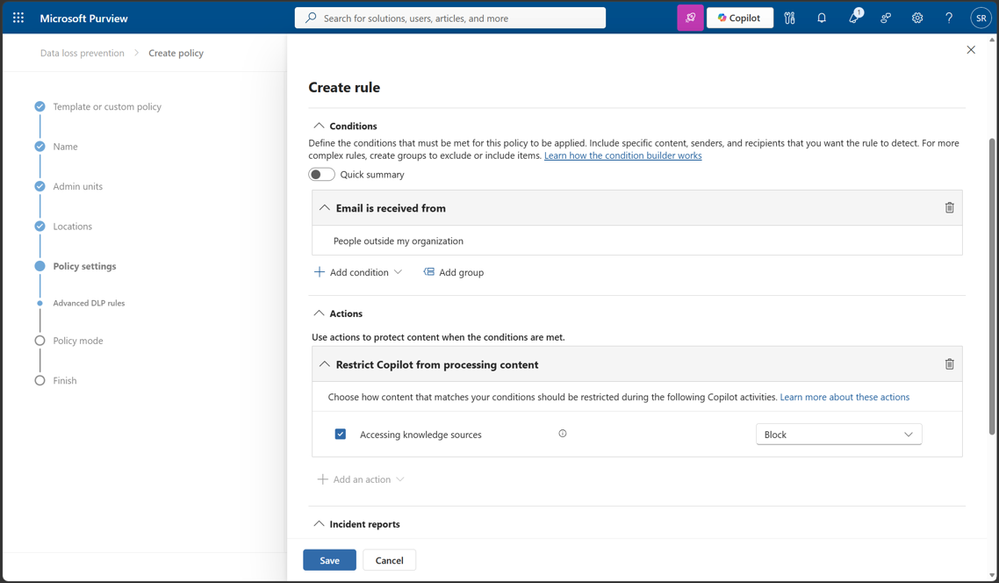
Organizations can now exclude up to 1,000 specified domains from Copilot’s web-grounded results. This helps prevent content from specific websites from entering Copilot’s web search, reducing the likelihood that responses will be influenced by undesirable or noncompliant sources while giving administrators greater oversight of web-grounded content. - DLP restrictions on referencing external emailPublic preview in June
This capability gives organizations greater control over how email data is used in Copilot responses. Microsoft Purview DLP for Microsoft 365 Copilot and Copilot Chat is being expanded to block references to external email. Administrators can now exclude emails from external senders so they are not summarized, referenced, or used as grounding data for responses. - Agent 365 dashboard in InsightsRolled out in July
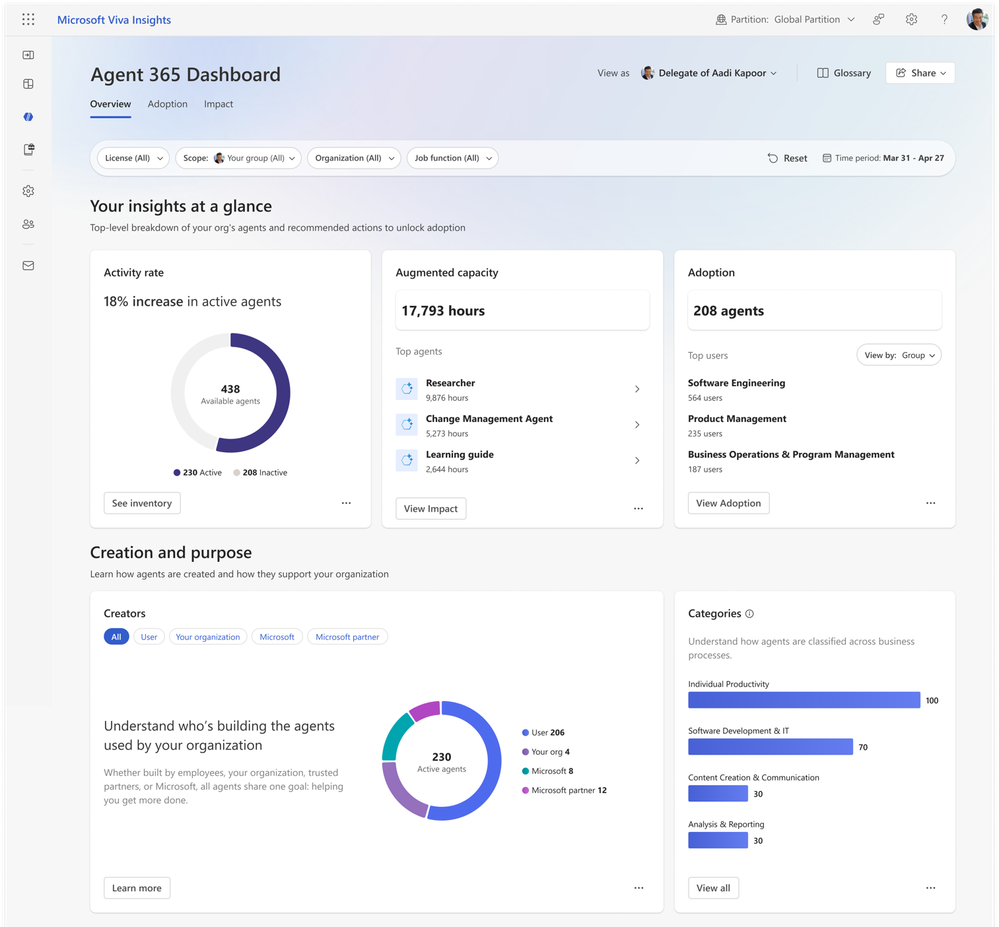
The Agent 365 dashboard helps business leaders track agent usage and adoption within their teams; analysts can also use organizational filtering to create organization-wide reports. The dashboard consolidates data from Agent 365, giving leaders a comprehensive view of their teams’ agent usage across sources and agent types: they can view adoption rates by user group, track retention, identify popular agents, and compare usage trends to better guide agent deployment strategies and optimization efforts, and can drill down into individual agent usage for deeper insights. A toggle in the same dashboard also displays historical reports for Copilot Studio agents. - Copilot connector usage reportRolled out in JunePublic preview
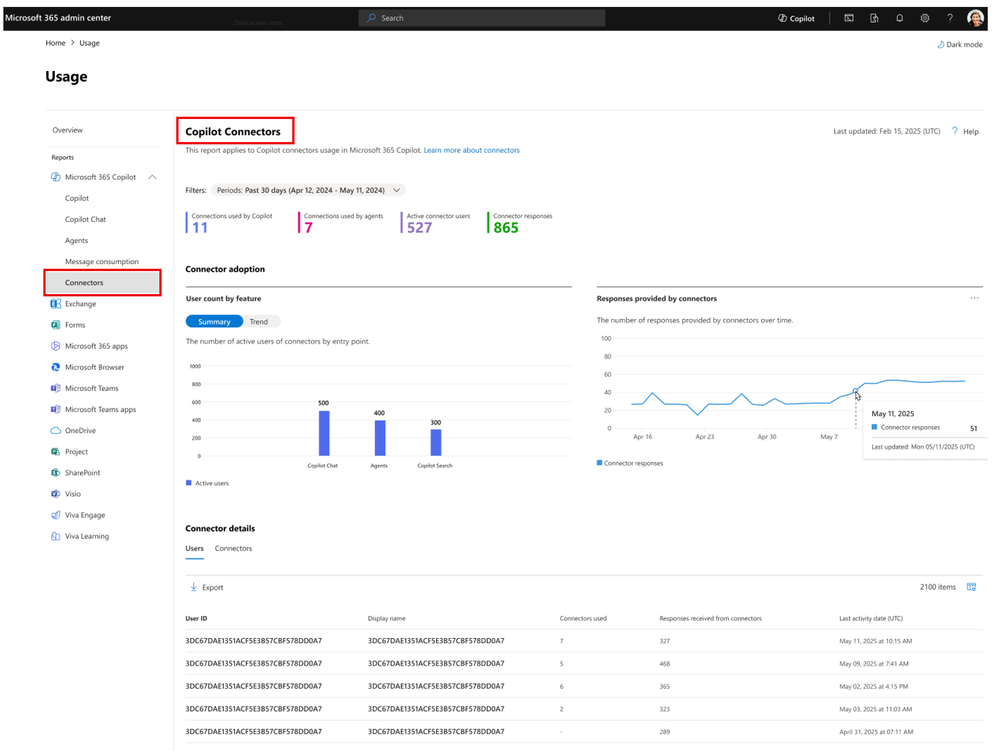
The new Copilot connector usage report in the Microsoft 365 admin center is now in public preview, helping IT administrators understand the value Copilot users gain from connected enterprise knowledge. The report shows what proportion of responses in Copilot Chat, Copilot Search, and various agents are grounded in content from connectors deployed by the organization, giving administrators a clearer view of connector adoption, engagement, usage patterns, and the impact of each connector. Administrators can use this information to assess which connected data sources are truly delivering value and continuously optimize their connector deployment strategy. - Copilot Chat usage report for GCC / GCC High / DoDRolled out in July
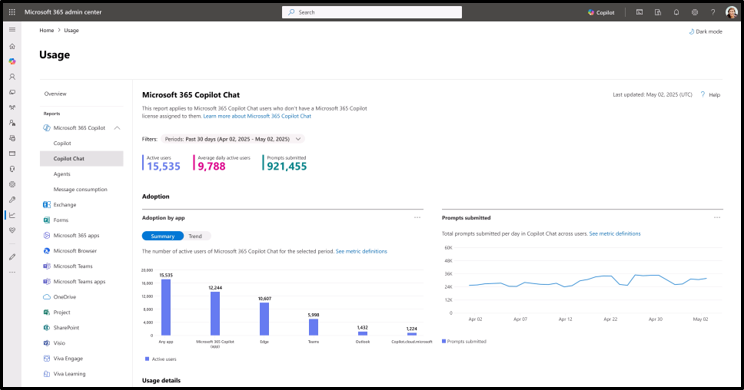
The Copilot Chat usage report for GCC, GCC High, and DoD customers is now available in the Microsoft 365 admin center, helping customers understand and drive Copilot Chat adoption. Administrators can view organization-level usage to track trends, as well as user-level details to support Microsoft 365 Copilot licensing decisions. The report includes the total number of active users, Copilot Chat usage broken down by Microsoft 365 app, and user-level activity insights, which are anonymized by default. - Cost management updatesRolled out in July
Cost management in the Microsoft 365 admin center has been improved in alert reliability, policy enforcement clarity, overage handling, and visibility into Copilot credits, giving administrators greater confidence when monitoring and managing AI consumption costs for services such as Cowork and the Work IQ API. Key improvements include:- More reliable alerts: Administrators can be notified promptly and take swift action when consumption approaches a policy threshold. As part of this update, administrators should recreate alerts for existing spending policies that require notifications.
- Clearer spending policy logic: When a user is subject to multiple spending policies, they remain on the policy with the highest per-person limit; even after reaching that limit, the user is not moved to another policy.
- More reasonable overage handling: If a user reaches a spending policy limit while performing a task, they can complete the current task without incurring billable overages. This overage is not billed and does not appear as consumed credits in cost management reports.
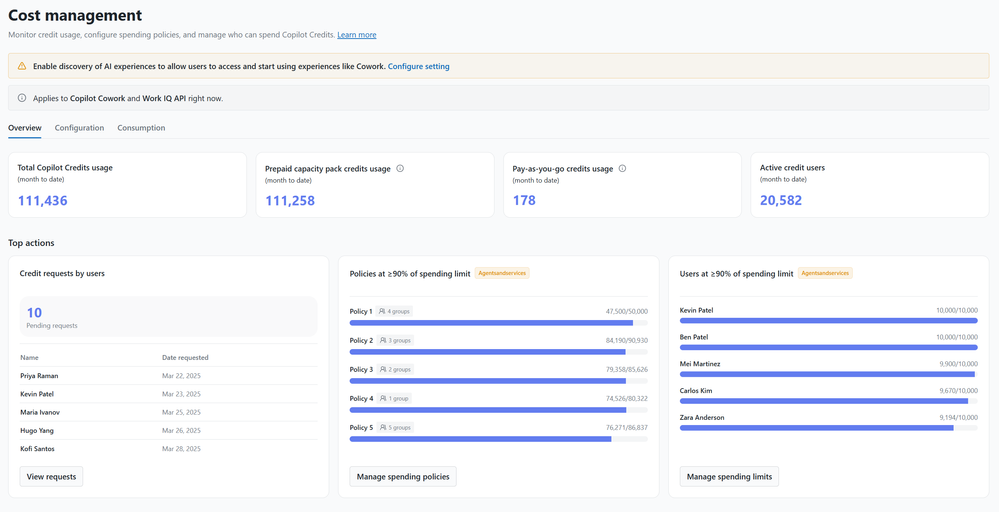
Cost management in the Microsoft 365 admin center