MICROSOFT COPILOT BLOG
Microsoft Copilot: What's New | September 2026
This edition covers Microsoft's official monthly Copilot updates for September 2026, including chat and mobile experiences, plugins and Work IQ, Teams Phone, Word, PowerPoint, SharePoint, OneDrive, as well as authoritative sources and targeted survey capabilities for administrators. The features and rollout plans below follow the order of the official article, and all timing reflects the wording used in that article.

User capabilities
Copilot Chat: A New Design and Enhanced Capabilities
-
A Refreshed Copilot in Teams and OutlookAvailable in September
Copilot in Teams and Outlook is adopting a new design consistent with the Copilot app, simplifying navigation and chat interactions while offering new ways to organize work. The redesign covers both full-screen Copilot and the in-app Copilot side pane.
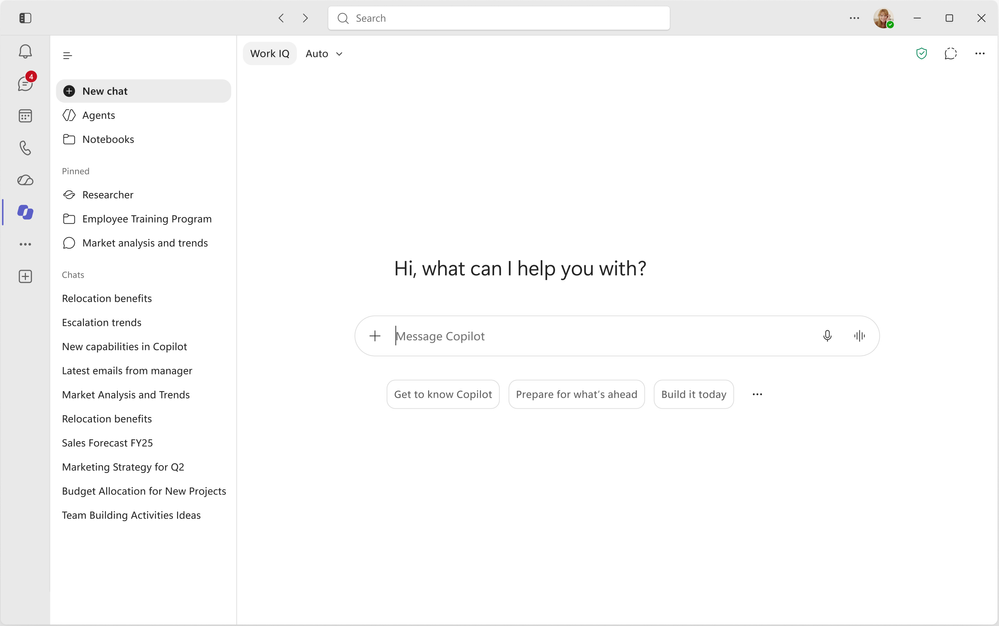
The refreshed Copilot chat interface in Teams 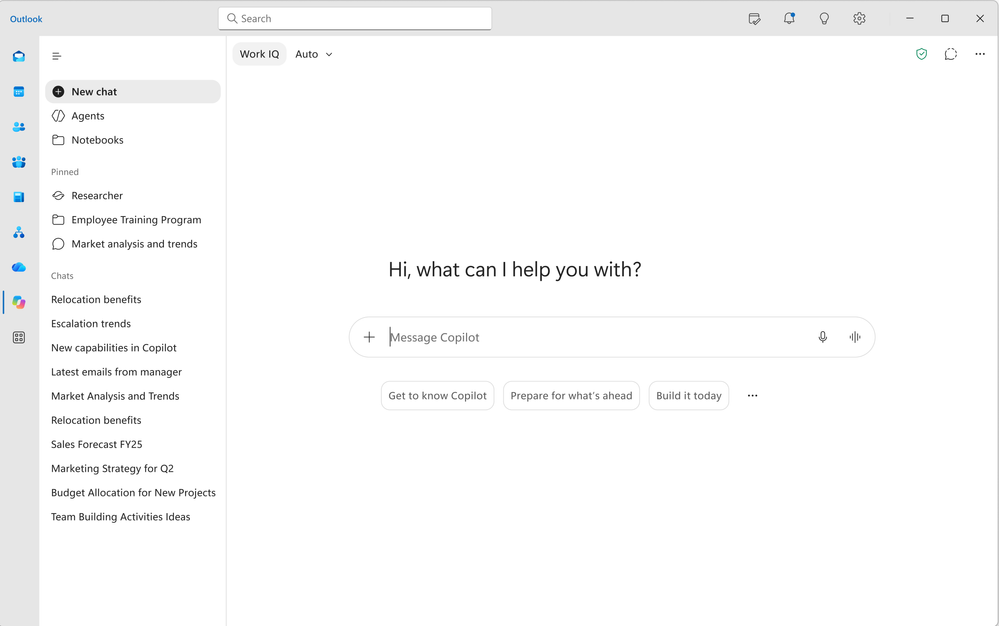
The new experience in the Teams Copilot tab -
The Copilot New Tab Page in EdgeComing in October
The new Copilot tab page will bring search, chat, and web exploration together in a single search box while presenting recommended Copilot actions and curated work content, reducing the need to switch between different entry points. View the roadmap.
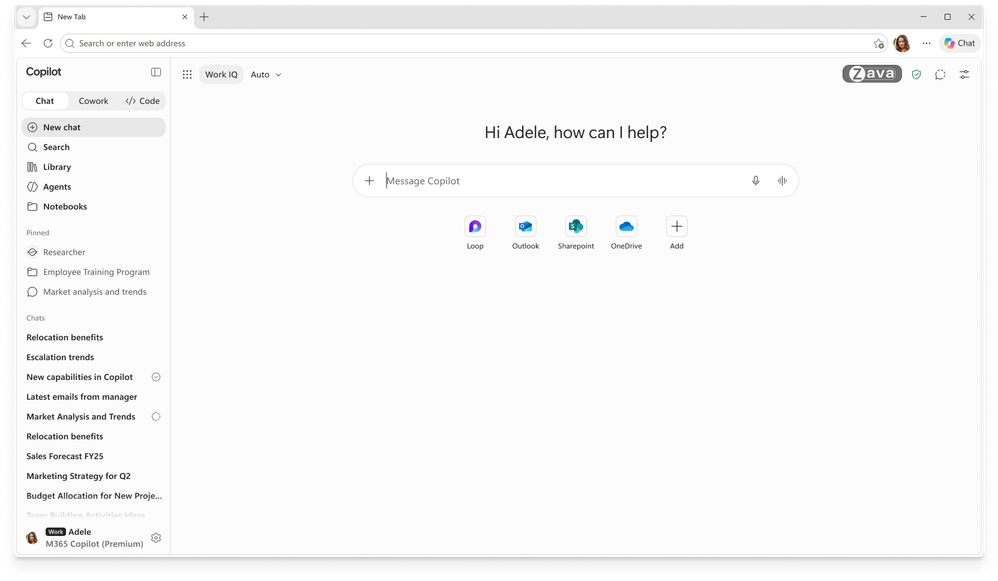
The Copilot new tab page in Microsoft Edge, bringing search, chat, and work content together -
Invoke Agents and Skills Directly in PromptsAvailable in September
While writing a prompt, users can invoke agents with
/and skills with@, adding specialized capabilities without interrupting their flow. View the roadmap. -
More Accurate Matching for Scanned PDF ContentAvailable in September
Copilot Chat now matches search results from scanned PDFs more effectively, helping users locate relevant information faster and spend less time searching page by page. View the roadmap.
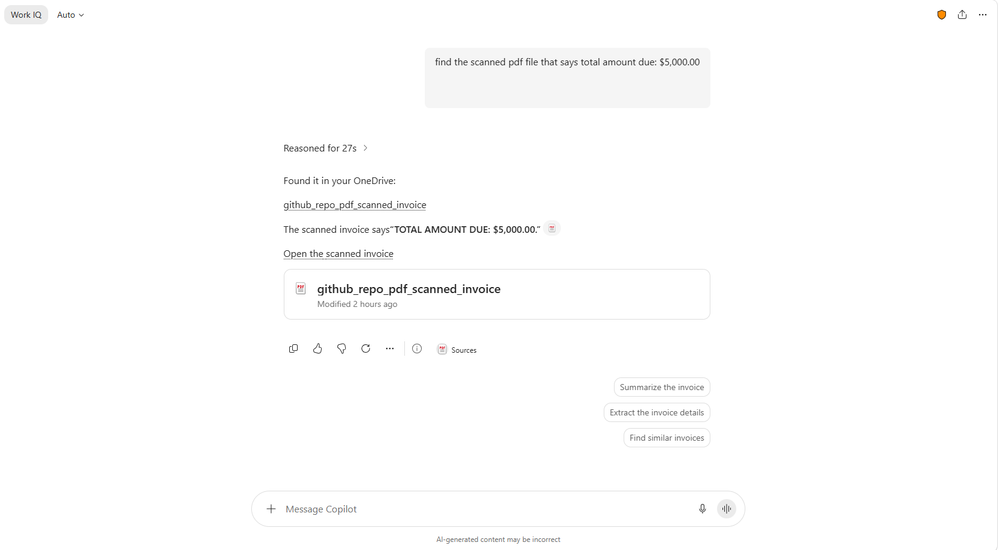
Copilot Chat matches relevant content from a scanned PDF -
Copilot Editing on AndroidAvailable on Android in September; available on iOS earlier this year
Word, PowerPoint, and Excel for Android now support modifying content with Copilot, enabling users to keep working on documents, presentations, and spreadsheets from a mobile device. The corresponding capabilities became available on iOS earlier in 2026.
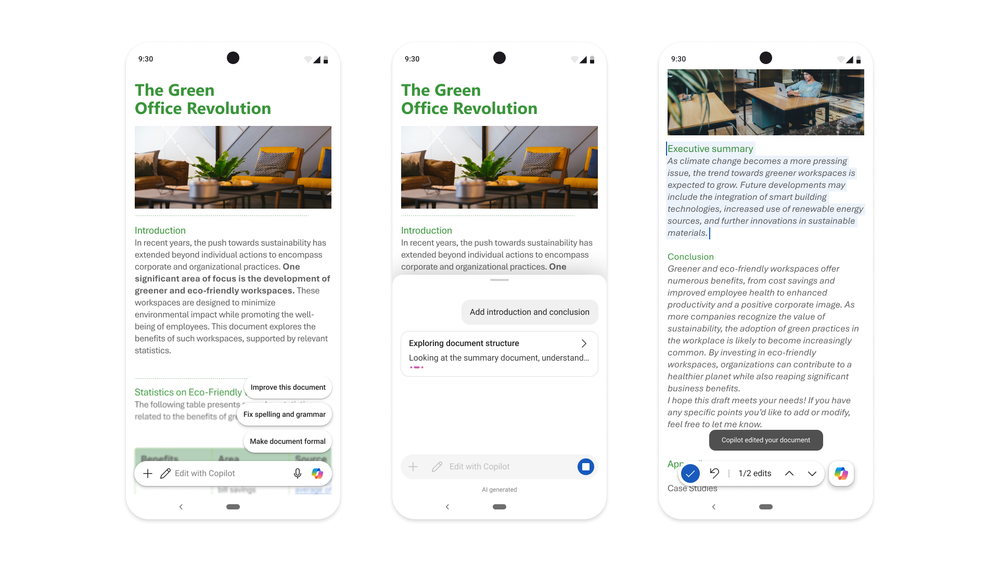
The Copilot editing experience in Word for Android
Copilot App: Updates to Plugins, Connectors, and Work IQ
-
New Connectors, Plugins, and Agents
More business systems and industry knowledge are being connected to Copilot. This month, Microsoft listed the following 33 connectors, plugins, or agents across eight industry categories; the article does not specify a rollout date for each item. Learn more through Microsoft Marketplace.
Industry Connectors, plugins, and agents Industrial and manufacturing Autodesk, Resilinic, Vista Finance by Trimble Professional and business services askpolly Financial services Fiscal AI, D&B Risk Analytics, D&B Finance Analytics, Zacks, MT Newswires, PrivCo, S&P Global Kensho, Square, Morningstar Credit Analytics Healthcare and life sciences AMASS, Cortellis Regulatory Intelligence, SciLeads, Causaly, BioRender, ClinicalTrials.gov, PubMed, PopHive, bioRxiv, DrugBank, CAS, Open Targets, NPI Registry, MedlinePlus Energy and resources Rystad Energy Human resources TechWolf Analyst Agent Software and technology Webflow Retail and consumer goods NielsenIQ, Cloudinary, Contentsquare -
A Unified Microsoft Plugin RegistryAvailable in September
The Microsoft Plugin Registry provides a unified catalog for Microsoft, partner, and custom plugins, making capabilities such as skills and connectors available in the Copilot app and Microsoft 365 apps. IT administrators only need to discover and approve them once, after which they can manage them centrally through the Microsoft 365 admin center and Agent 365 and make them available consistently across Copilot experiences. Developers and partners can also publish once and scale deployment while preserving administrator control.
-
Bring SharePoint Framework Interactive Components into ChatRolling out to Frontier in September
SharePoint Framework apps can present interactive interfaces directly in Copilot chat. Without leaving the conversation, users can view information, interact with controls, and perform actions.
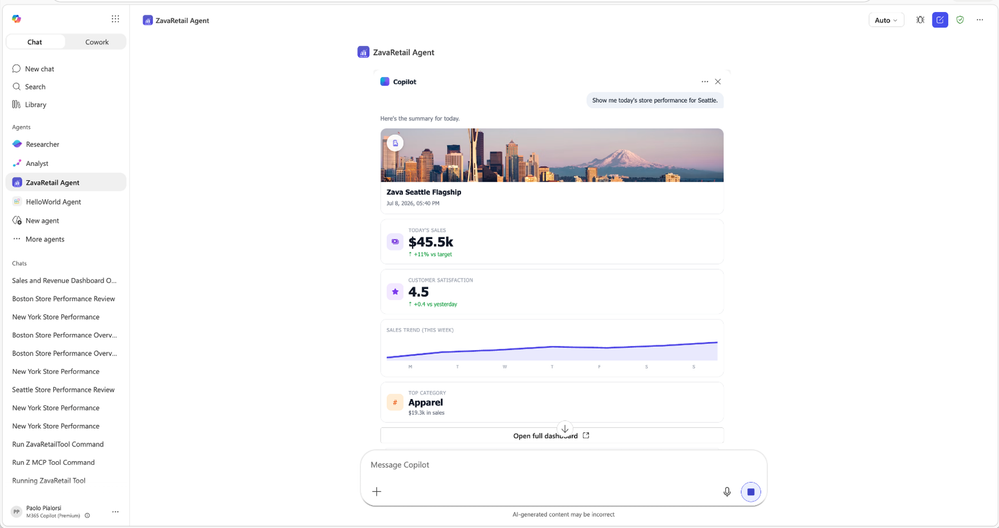
Using SharePoint Framework interactive components directly in Copilot chat -
Record in the Copilot Mobile AppAvailable in September
Record supports capturing in-person conversations and voice notes, then generating AI transcriptions and summaries in Copilot Chat. Users can ask follow-up questions, extract action items, or continue working from the recording, making it useful for impromptu discussions, customer visits, and dictated ideas. View the roadmap.
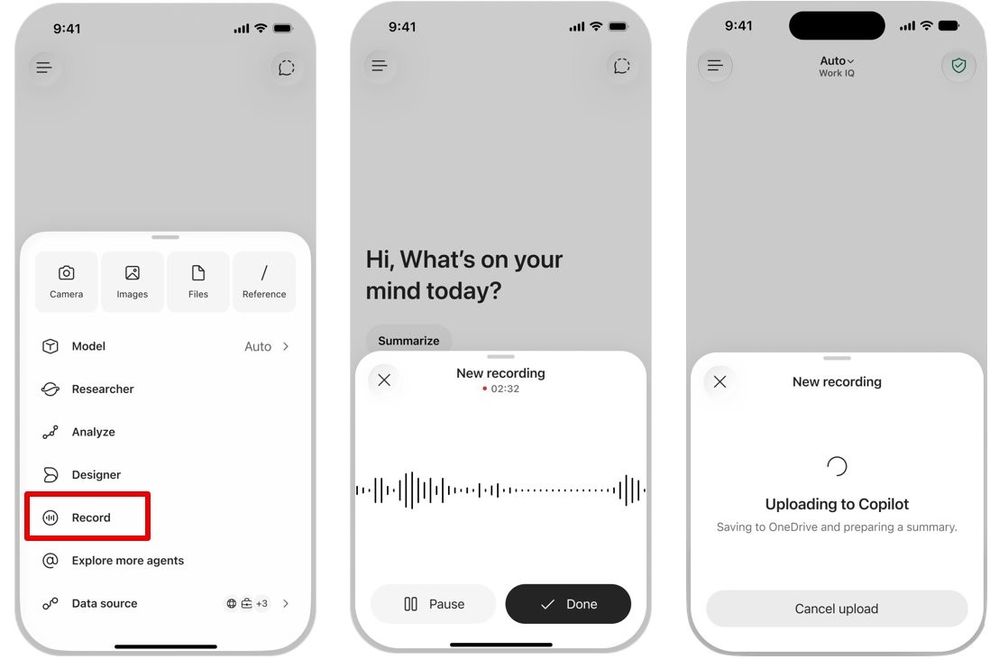
Recording audio in the Copilot mobile app and having Copilot organize the content
Teams Phone Agent: AI Reception for Incoming Calls
-
Handle Common Calls and Complete TransfersAvailable in September
Teams Phone Agent is designed for customer service organizations and departments that already use Teams Phone, such as branch offices and IT help desks. It can handle repetitive inquiries, answer frequently asked questions, book or reschedule appointments, and support more than 60 languages. When human assistance is needed, it can transfer the caller to the appropriate department or employee while providing an AI-generated conversation summary, reducing menu navigation and the need for callers to repeat themselves.
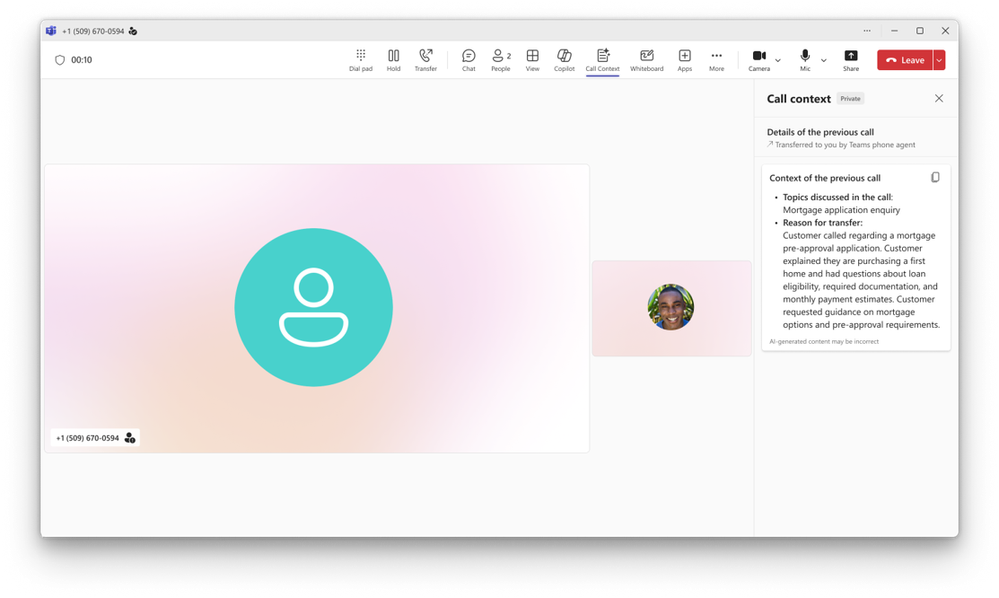
A conversation summary generated for a call by Teams Phone Agent
Copilot in Word: Source Citations and Image Adjustments
-
View Source Citations in ResponsesAvailable in September
Copilot responses in Word now directly display citations to relevant web and work sources, helping users understand the basis for an answer and return to the corresponding sources to verify the content.
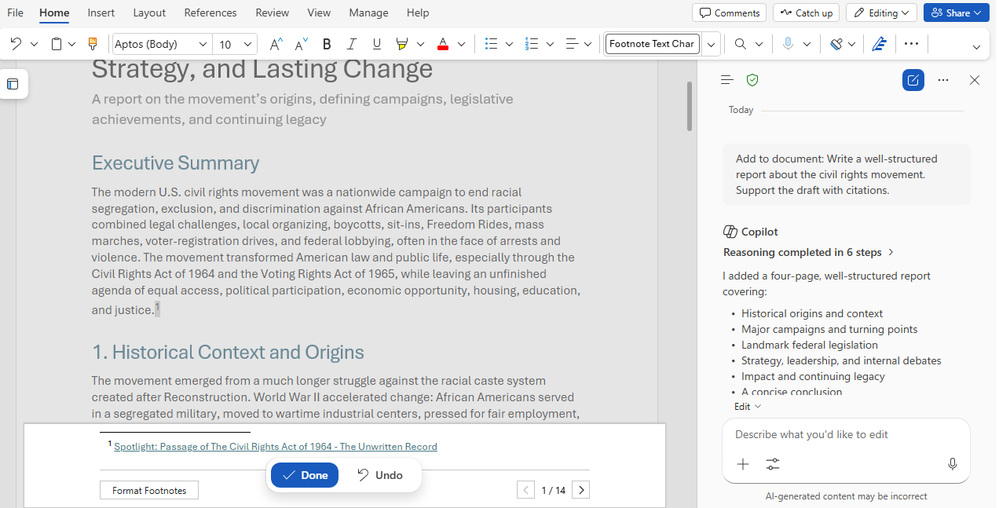
Copilot responses in Word show source citations -
Arrange and Modify Images and Shapes DirectlyAvailable in September
Users can ask Copilot to adjust visual elements such as images and shapes directly within a Word document, reducing manual arrangement and layout work and making it easier to improve the document's presentation.
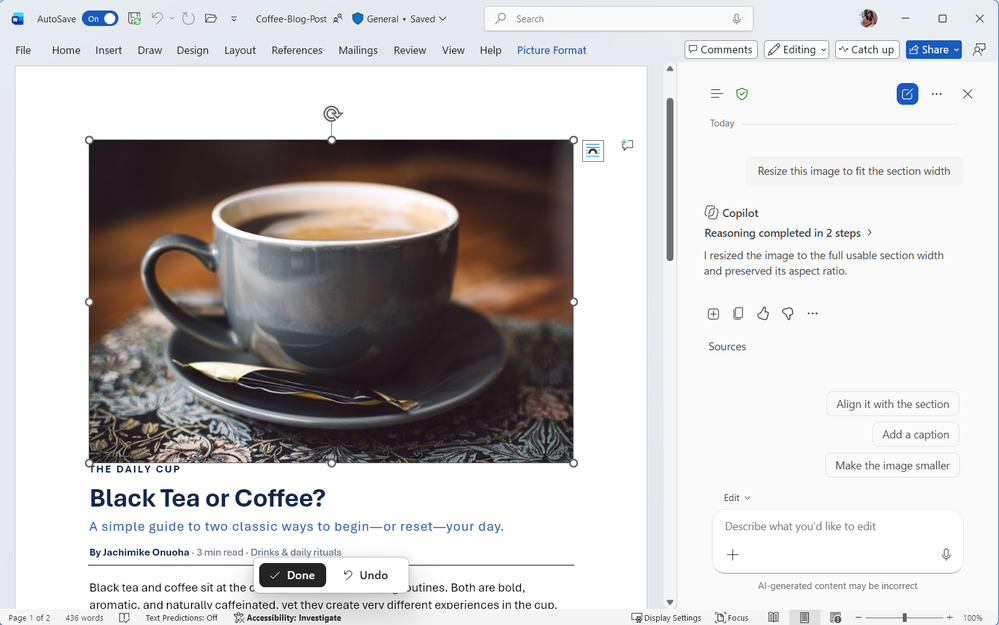
Adjusting images in a Word document with Copilot
Copilot in PowerPoint: Skills, Connectors, and Background Execution
-
Package Multistep Presentation Workflows as Skills
Skills turn presentation work that requires multiple steps into reusable capabilities, helping Copilot follow an established process without requiring users to rewrite each prompt step by step. Learn about brand kits and skills.
Demo: Custom skills in PowerPoint (video from Microsoft's official article; an internet connection is required for playback) -
Prebuilt SkillsAvailable in September
New prebuilt skills address common presentation improvement needs: “Explain this presentation” helps review the narrative, audience fit, and overall flow, while “Sharpen slide titles” rewrites slide titles so they summarize the content of each slide more accurately.
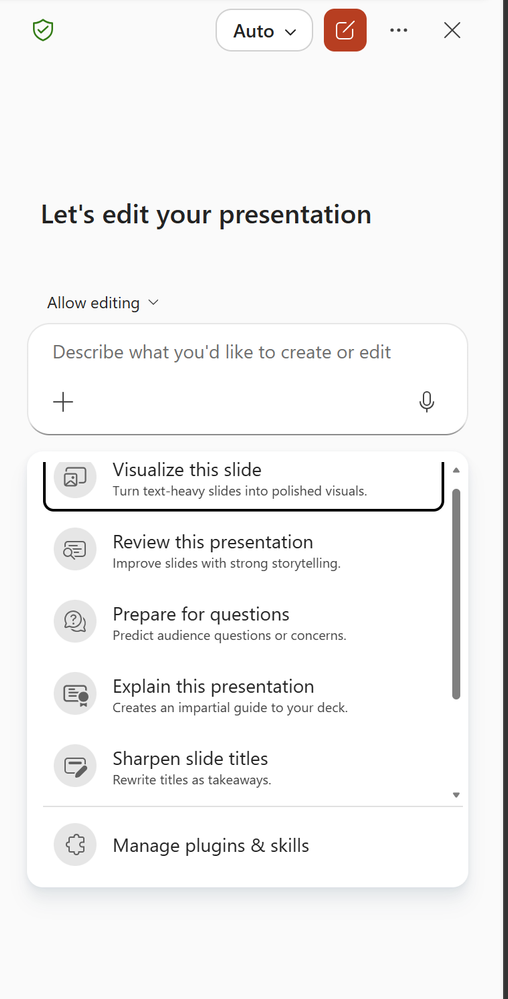
Prebuilt skills available in PowerPoint -
Administrators Distribute Skills CentrallyAvailable in September
Administrators can publish approved skills to selected users, user groups, or the entire organization, so team members no longer need to create or upload the same skill individually.
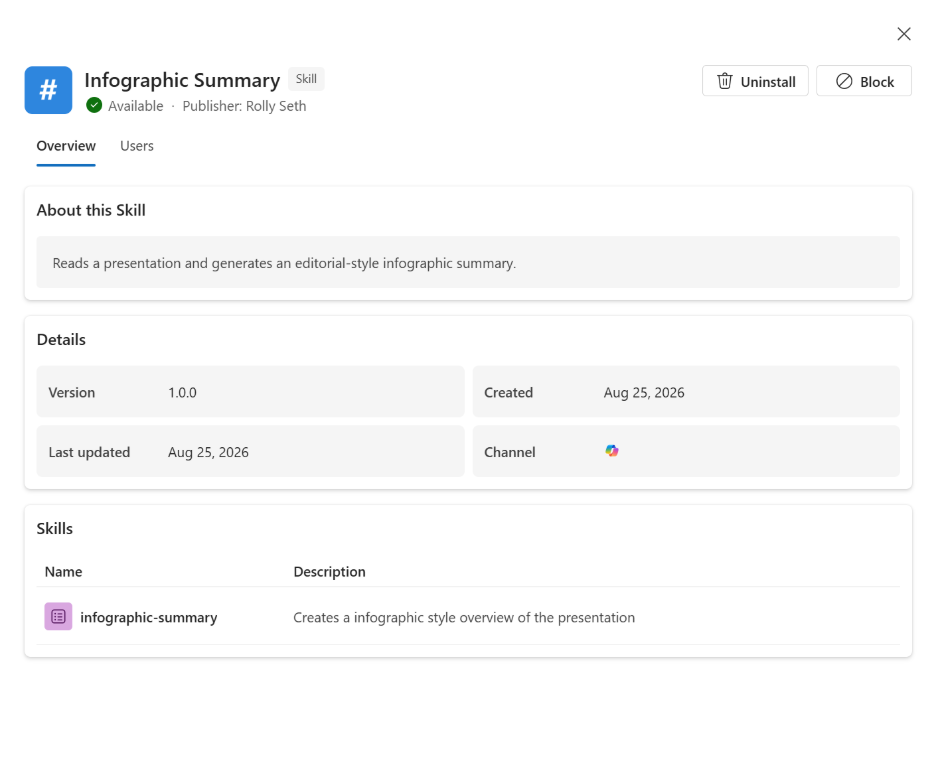
Administrators distribute approved PowerPoint skills to their organization -
Brand Kits Support SkillsComing in October
Brand managers can place reusable workflow skills in a brand kit alongside the organization's visual standards, allowing presentations to follow both appearance requirements and a consistent workflow. View the brand skill guidance.
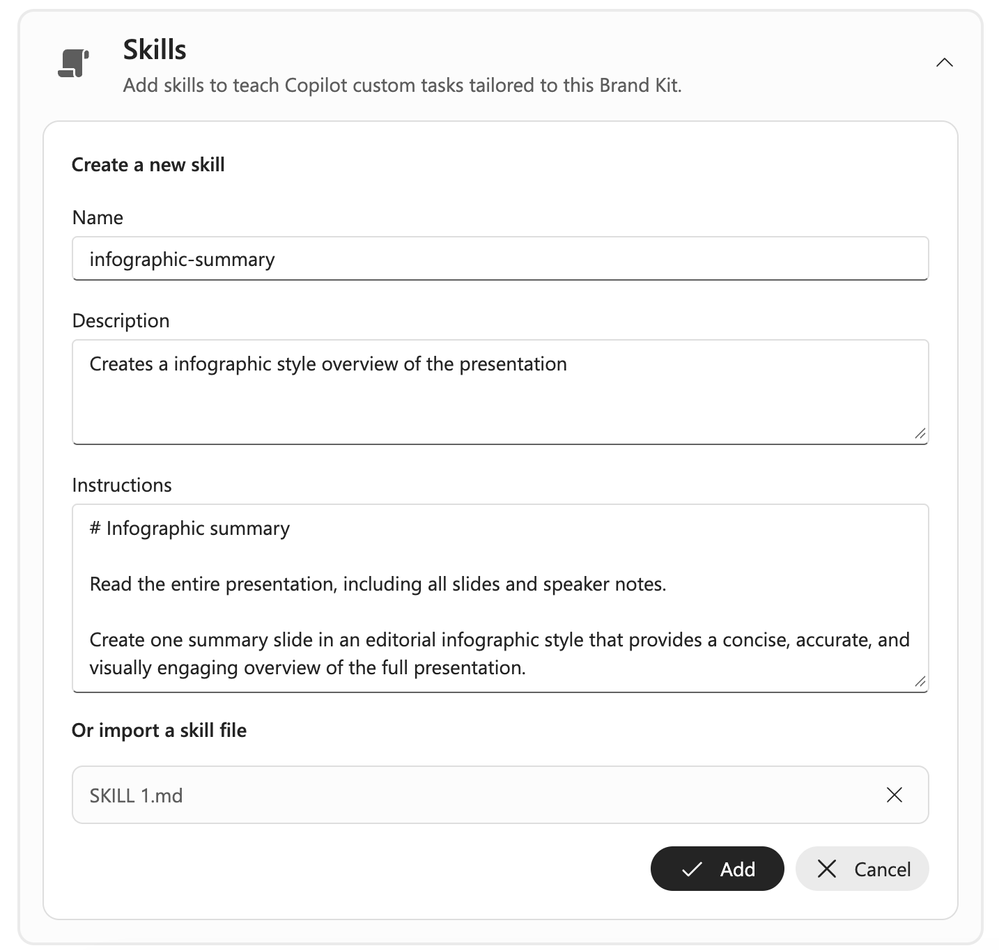
Skills and visual standards in a brand kit -
Reference Business Materials Through ConnectorsAvailable in September
When creating slides, users can directly use information from connected apps and data sources, grounding presentations in their organization's existing materials and reducing the need to find and move content across multiple systems.
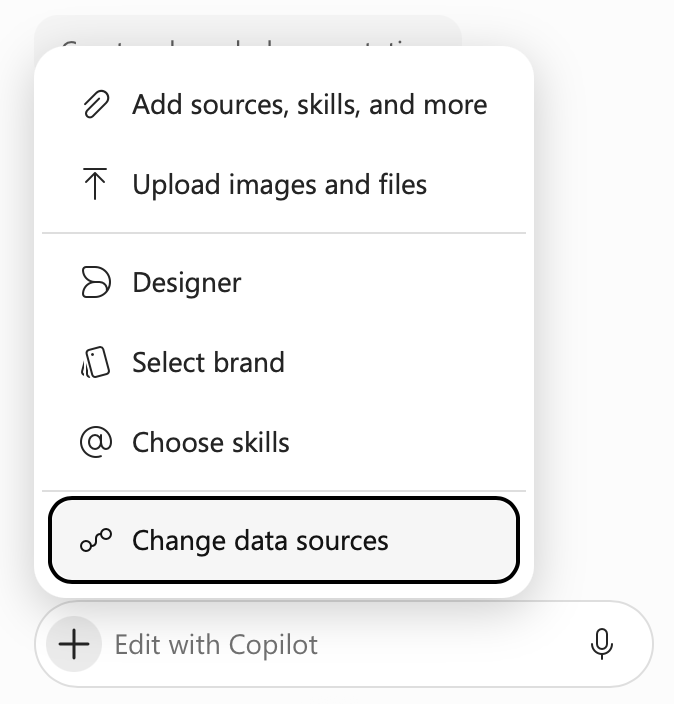
Selecting connectors and data sources in PowerPoint -
Long-Running Tasks Continue in the BackgroundComing in October
Copilot can continue long-running tasks after users leave PowerPoint, switch devices, go offline, or finish work for the day, and notify them when the work is complete or requires their attention. The experience spans desktop, web, and mobile.
Copilot in SharePoint Is Generally Available
-
Create, Organize, and Understand Content in Sites and Document LibrariesAvailable in September; generally available
Copilot in SharePoint can help create and organize content directly in sites and document libraries, answer questions grounded in SharePoint, generate document library metadata, and use skills to reuse repetitive workflows. Advanced capabilities also include image generation and editing, AI site analytics reports, and near-real-time metadata autofill. View the roadmap.
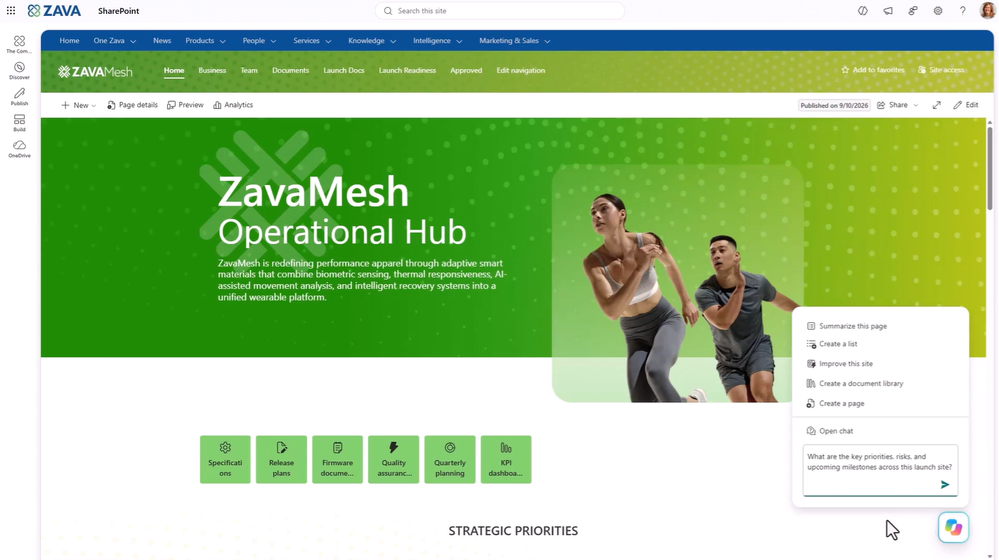
Copilot in SharePoint sites and document libraries -
Copilot Search Becomes the Default Search in SharePoint and OneDriveRolling out to Frontier in September
The new default search combines natural-language understanding, semantic retrieval, and AI-generated answers. Within the supported content scope, it retrieves information according to users' existing permissions and generates answers, helping them find what they need more directly.
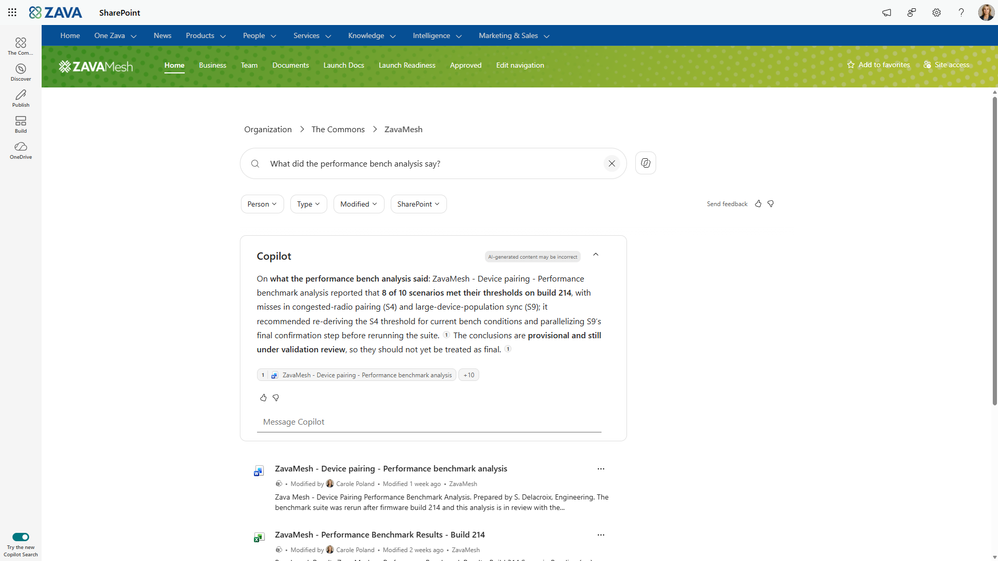
The Copilot-powered search experience in SharePoint
Copilot in OneDrive Is Generally Available
-
A Content Experience Consistent with SharePointAvailable in September; generally available
The rebuilt Copilot in OneDrive uses the same foundation as Copilot in SharePoint, providing a more consistent experience for creating and organizing content and working with files, so work is not fragmented based on where content is stored. Its licensing is the same as Copilot in SharePoint; the original article does not list specific licensing plans.
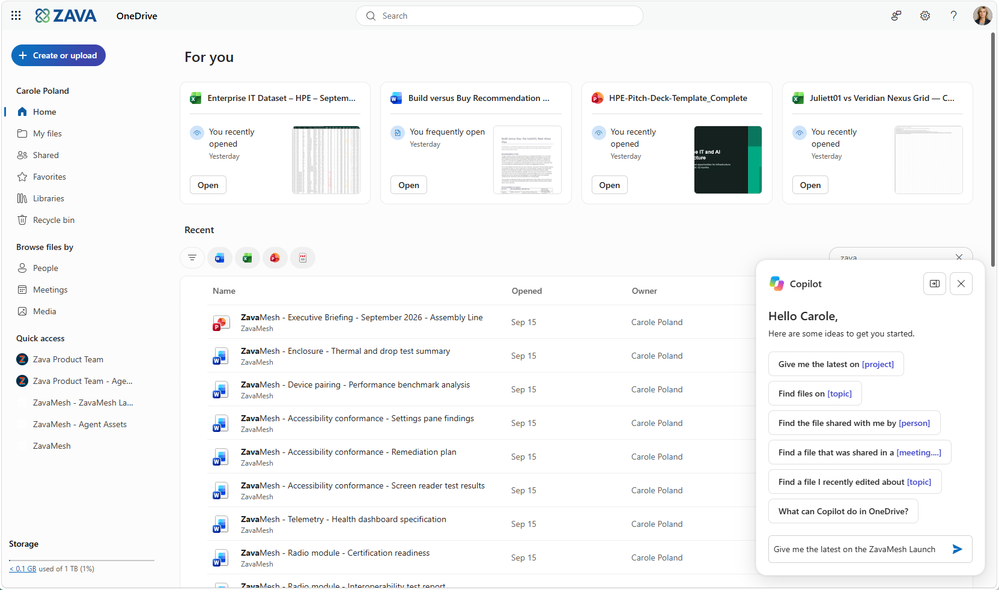
The Copilot interface in a OneDrive folder
IT admin capabilities
Microsoft 365 Admin Center: Authoritative Source Management
-
Centrally Designate Authoritative SharePoint Sites for the OrganizationAvailable in September
Administrators can mark up to 100 SharePoint sites as authoritative sources for Copilot Search, identifying verified official content to improve the relevance and trustworthiness of Copilot Search and Chat results. The centralized management interface supports viewing, adding, and removing sources, as well as importing and exporting them in bulk. View the roadmap.
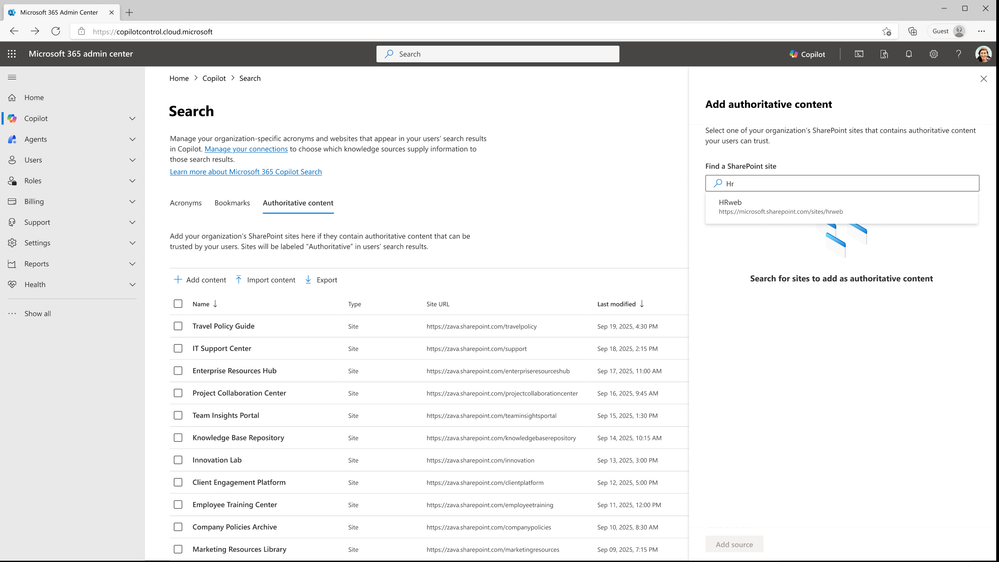
Authoritative source management in the Microsoft 365 admin center
Copilot Dashboard: Targeted Pulse Surveys
-
Combine Adoption Data with Targeted FeedbackAvailable in September
Leaders can use dynamic survey lists to launch targeted Pulse surveys: audiences are generated from Copilot adoption data and refined with existing criteria, reducing manual maintenance of recipient lists. Combining employee sentiment with adoption information helps assess the experience and identify opportunities to increase adoption. To protect privacy, surveys use aggregated, population-level reporting rather than showing individual usage. View the roadmap.
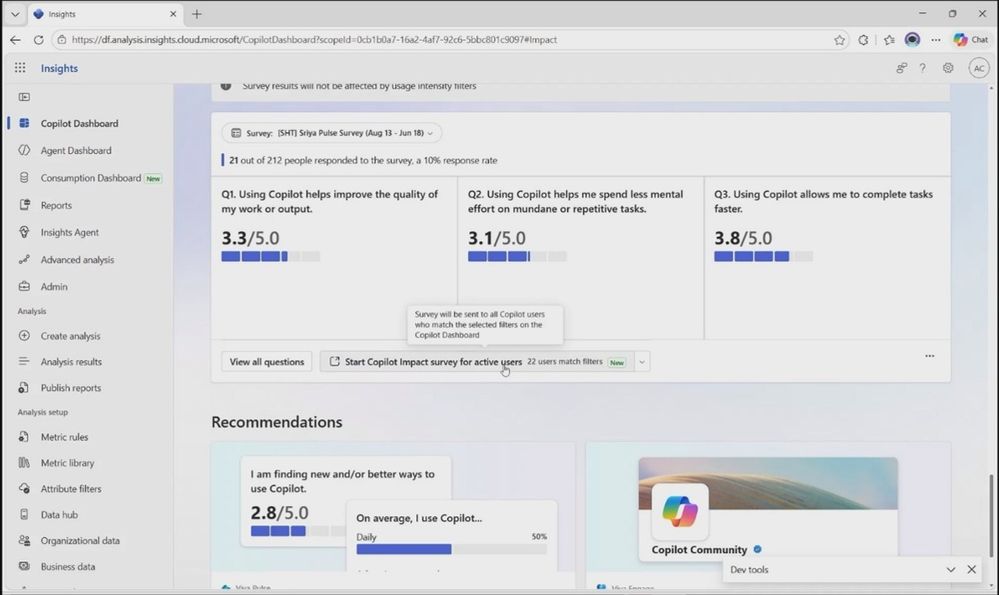
Survey questions and feedback in the Copilot Dashboard 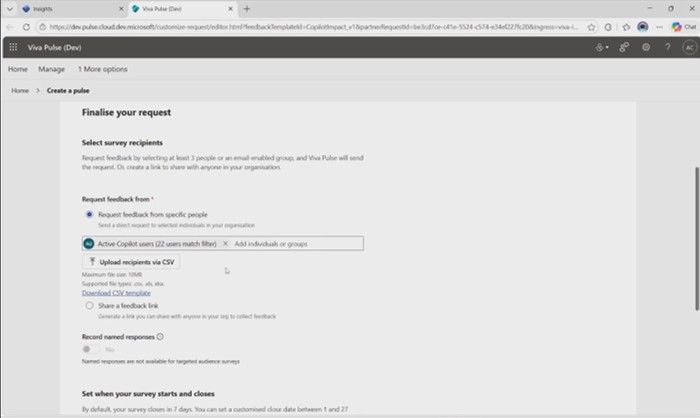
Configuring a Copilot survey with a targeted audience